
How to Download Audio From Instagram (Reels, Videos, Stories) | InsgramIO
The audio you hear on a Reel is part of the video file itself.
Quick answer: Instagram doesn't offer a way to download just the audio from a post on its own. The sound is embedded in the video file, so downloading the video is what gets you the audio. From there, you can play it, keep it as is, or extract just the sound using a separate audio tool if you need an audio-only file.
How audio actually works on Instagram posts
Every Reel, video post, or Story with sound has that audio baked directly into the video file. Instagram doesn't separate the two for download purposes. So when people search for a way to download just the audio, what they actually need is the video file — the audio comes along with it automatically.
This is true whether the sound is the creator's original voice, background noise from filming, or a trending music track added afterward.
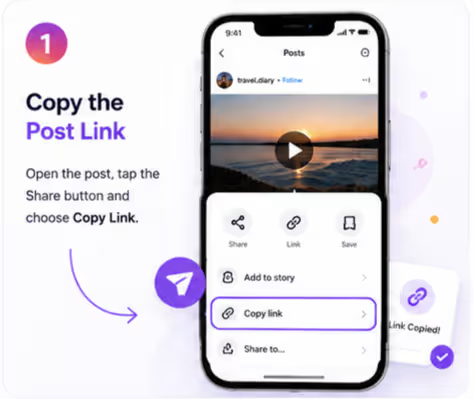
Step one: copy the link to the post with the audio you want.
Step-by-step: saving the audio
- Open the Reel, video, or Story that has the audio you want.
- Tap the three dots (⋯) and select Copy Link.
- Paste the link into the Instagram Video Downloader or the Instagram Reels Downloader, depending on the content type.
- Download the file. The audio is included in the video, playing exactly as it does on Instagram.
- If you specifically need an audio-only file, use a separate audio extraction tool on the downloaded video to pull out just the sound.
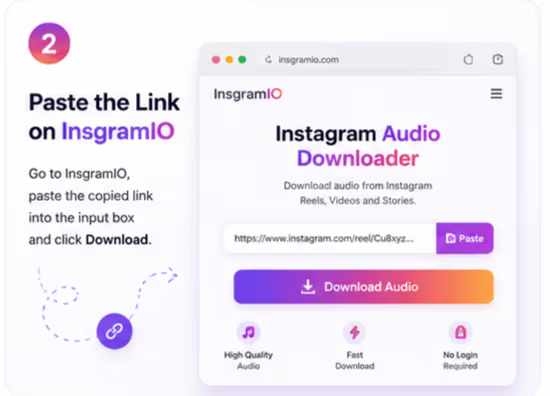
Step two: download the full video — the audio is already inside it.
Mobile and desktop guidance
On iPhone and Android, the downloaded video (with audio) saves to your Files app or Downloads folder depending on your browser. On desktop, it lands in your regular downloads location. Once saved, you can open the file in any standard video player to hear the audio, or move it into an audio-editing app if you want to isolate the sound.
Original audio vs. licensed music tracks
Some posts use original sound recorded by the creator. Others use a licensed music track from Instagram's audio library. Both download the same way as part of the video file, but they carry different considerations if you plan to reuse the audio elsewhere. Original sound created by the poster is their content. A licensed music track belongs to the rights holder of that song, regardless of who used it in their Reel.
Troubleshooting
- No sound in the downloaded file. This can happen if the original post's audio was removed or restricted by the creator, or if the track is unavailable in your region. The download reflects whatever Instagram is currently serving for that post.
- Download won't start. Check that the link was copied directly from the post's share menu, not from a bio link or shortened redirect.
- Audio sounds distorted. This usually traces back to the quality of the original upload, not the download process.
Common mistakes to avoid
- Expecting a direct "audio only" download button — Instagram content doesn't work that way, and any tool claiming otherwise is misrepresenting what it does.
- Assuming all sound in a Reel is free to reuse commercially. Licensed tracks carry separate rights from the video itself.
- Trying to download audio from a private account. Only public posts can be accessed by any downloader.
Copyright basics for reused audio
Saving audio for personal listening is generally low-risk. Using someone's original voice recording or a licensed music track in your own content — especially for anything commercial — is where copyright matters most. If you plan to reuse a sound beyond personal listening, check whether it's original content, a licensed track, or something that needs separate permission.
Results may vary depending on the original post's audio quality and availability. This tool works with public content only.
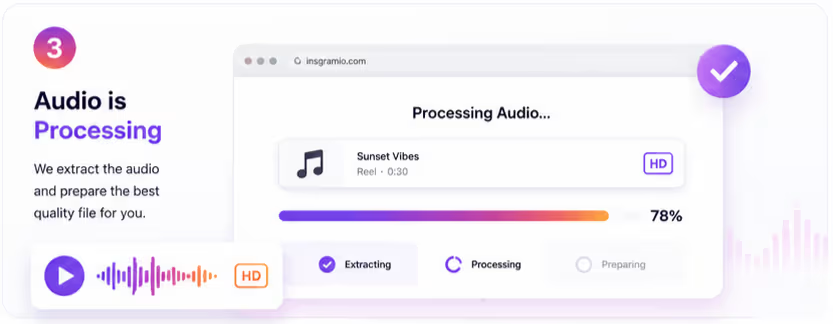
Once downloaded, the audio is yours to replay anytime.
Quick summary
There's no separate "audio download" feature on Instagram — the sound is part of the video file. Downloading the video with the Instagram Video Downloader gets you the audio along with it, and from there you can extract it separately if you need an audio-only file.
Ready to save a video with its audio? Try the Instagram Video Downloader — no app, no login, no watermark.
Frequently asked questions
Can I download just the audio from an Instagram post without the video?
Not directly. The audio is part of the video file, so downloading the video is what gives you the audio. A separate audio extraction tool can pull the sound out afterward if needed.
Does the downloaded audio match the original quality?
Yes, the audio quality reflects whatever Instagram is currently serving for that post, matching the original upload.
Why is there no sound in my downloaded video?
This can happen if the creator removed the original audio, or if the specific music track is restricted in your region. The download shows exactly what Instagram is currently serving.
Can I download audio from a private account's Reel?
No. Private account content can't be accessed by any downloader. Only public posts are available.
Is downloaded Instagram audio free to use in my own content?
It depends on the source. Original sound belongs to the creator who recorded it, and licensed music tracks belong to the rights holder. Both can carry restrictions on commercial reuse.
Do I need to log in to download audio from Instagram?
No login is required. You only need the public link to the post containing the audio you want.
Can I download audio from a Story?
Yes, if the Story is still active and from a public account, the same video download process applies, and the audio comes along with the video file.
What file format does the audio come in?
The audio downloads as part of the video file, typically in MP4 format. A separate conversion tool is needed to save it as an audio-only file like MP3.
Why does my downloaded audio sound different from what I heard on Instagram?
This is usually related to the original upload quality rather than the download process itself.
Can I identify a song from a Reel using a downloader?
No, song identification isn't part of a downloader's function. Instagram's own audio page under a Reel is the best way to see the track name.
Is there a limit to how many audio files I can download?
No, there's no limit on the number of downloads, though each is processed one link at a time.
Does InsgramIO store the audio or video files after download?
No. Files are delivered directly to your device and are not stored or hosted afterward.